Play casual arcade games to mine real Mainnet RB tokens, or claim a 100 Testnet RB bonus to test withdrawals right now!
Rush Box combines high-speed mobile gaming with real on-chain Pi rewards. Complete daily quests on our Android app to earn Mainnet tokens, and use this faucet portal to test your Pi Wallet integration.
🚀
Mine Mainnet RB Tokens
Daily Rewards via Android App
To mine and accumulate real Mainnet RB Tokens daily:
1
Download Rush Box App on Google Play Store (App ID: com.connectpi.bladerush).
2
Play Arcade Games: Slice fruit, hit targets in Knife Throw, or solve Arrow puzzles to rack up gaming points.
3
Daily Mining Streak: Convert game scores into Pi Mainnet tokens and withdraw to your verified wallet!
🎁
Claim 100 Testnet RB
Testnet Faucet & Wallet Verification
Test your Pi Wallet trustline by withdrawing 100 Testnet RB tokens for free.
⚠️ Mandatory Step Before Claiming:
You must enable the RB Token Trustline in your Pi Wallet before claiming.
• Asset Code: RB
• Issuer: GDA6O47PTNAOAXCG2ZJFJO7UPC3UR737WU7QGUJ4HYRV2WKG6M6CD4XR
🛠️
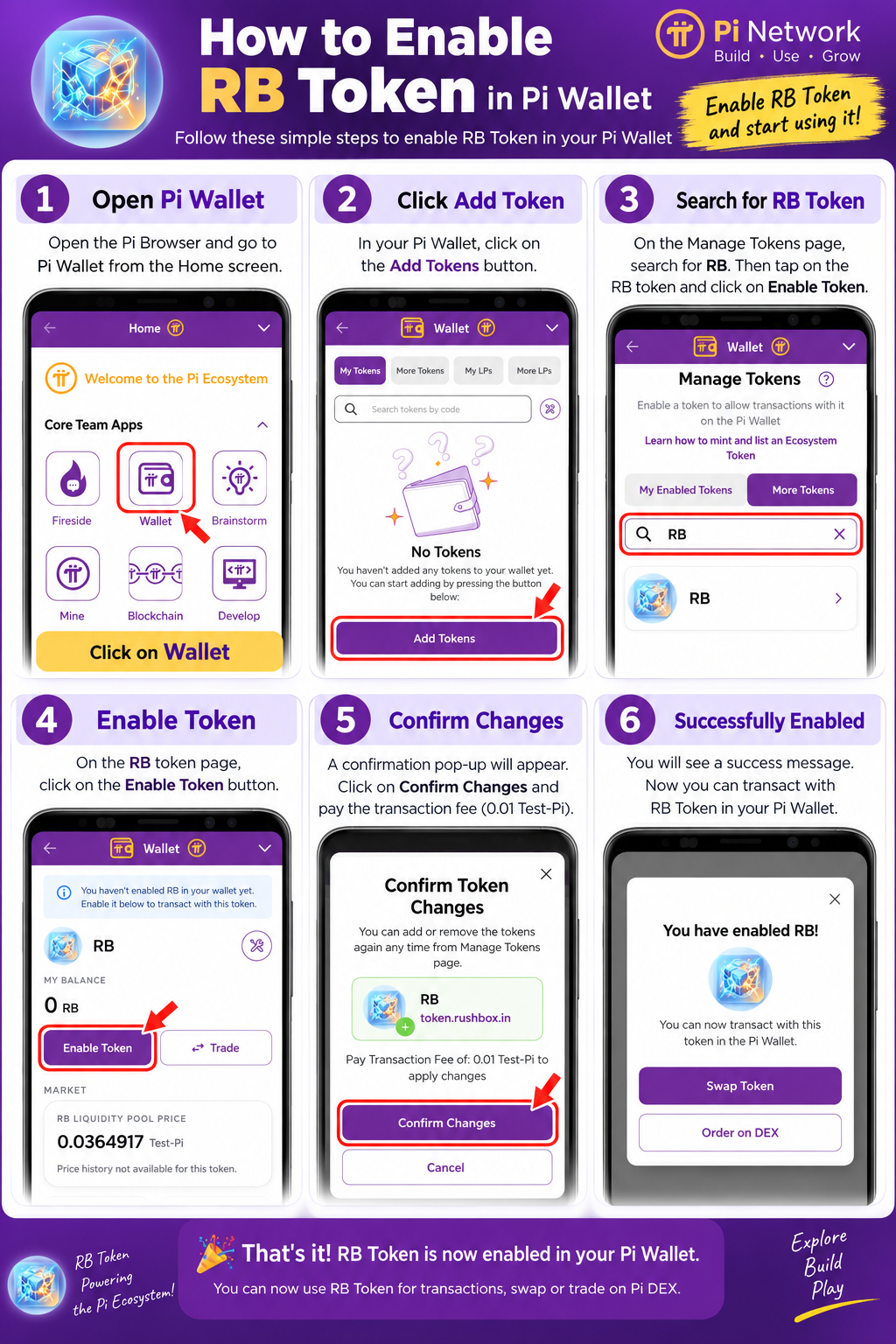
How to Enable RB Token in Pi Wallet (Step-by-Step Guide)
Follow these 6 simple steps to enable RB Token in your Pi Wallet and avoid op_no_trust error:
1
Open Pi Wallet: Open the Pi Browser app on your phone and go to Pi Wallet from the Home screen.
2
Click Add Token: In your Pi Wallet home screen, tap on the Add Tokens button.
3
Search for RB Token: On the Manage Tokens page, search for RB and select the RB token.
4
Enable Token: On the RB token detail page, click on the purple Enable Token button.
5
Confirm Changes: A confirmation pop-up appears. Click on Confirm Changes and approve the 0.01 Test-Pi fee.
6
Successfully Enabled 🎉: You will see "You have enabled RB!". You can now receive and transact RB tokens!
🔍 Click image above to view full high-res infographic guide